
Skip to content

Certification course

Learn Excel.

Learn Excel and become the one who actually knows the numbers.

4.8 · 873 reviews

$95Exam and certificate included

Full AccessEvery course and exam · $499

14-day money-back guarantee  ·  Instant access  ·  Lifetime access

Secure checkout Visa Mastercard American Express PayPalApple Pay Google Pay
  • BeginnerNo experience needed
  • 40 hoursAt your own pace
  • 42 modulesLessons, quizzes, exercises
  • Exam includedNo need to buy separately
  • W3Schools Hero1-year subscription included

Our learners work at

  • Microsoft
  • Google
  • Amazon
  • Meta
  • Netflix
  • NVIDIA
  • IBM
  • Oracle

What you'll learn

Real Excel skills, step by step.

Everything you need to use Excel with confidence, from the first line to real projects.

  • Master Excel interface and basic operations.
  • Learn Excel syntax and ranges.
  • Understand filling and cell manipulation techniques.
  • Work with formulas and references (relative/absolute).
  • Apply formatting and use Format Painter.
  • Master data analysis with sorting and filtering.
  • Create and customize tables.
  • Use conditional formatting and cell rules.
  • Create and customize various chart types (Bar, Column, Pie, Line).
  • Basics of PivotTables for data analysis.
  • Use Excel functions (AND, AVERAGE, COUNT, IF, SUM, etc.).
  • Apply Excel solutions to practical business cases.

Roles you'll be ready for

  • Data Analyst
  • Financial Analyst
  • Business Analyst
  • Accountant
  • Operations Manager
  • Project Coordinator
  • Administrative Assistant
  • Reporting Specialist
  • Sales Operations Analyst
  • HR Analyst
  • Marketing Analyst
  • Office Manager
  • Bookkeeper
  • Supply Chain Analyst

Syllabus

Everything the course covers.

7 chapters · 42 modules · 40 hours

01Getting started5 modules
  • Excel HOME
  • Excel Introduction
  • Excel Get Started
  • Excel Overview
  • Excel Syntax
02Working with cells7 modules
  • Excel Ranges
  • Excel Fill
  • Double Click to Fill
  • Excel Move Cells
  • Excel Add Cells
  • Excel Delete Cells
  • Excel Undo Redo
03Formulas and references6 modules
  • Excel Formulas
  • Excel Relative Reference
  • Excel Absolute Reference
  • Excel Arithmetic Operators
  • Excel Parentheses
  • Excel Functions
04Formatting8 modules
  • Excel Formatting
  • Excel Format Painter
  • Excel Format Colors
  • Excel Format Fonts
  • Excel Format Borders
  • Excel Format Numbers
  • Excel Format Grids
  • Excel Format Settings
05Sort, filter and tables8 modules
  • Excel Sort
  • Excel Filter
  • Excel Tables
  • Table Design
  • Table Resizing
  • Remove Duplicates
  • Convert Table to Range
  • Table Style
06Conditional formatting and charts5 modules
  • Excel Conditional Format
  • Excel Charts
  • Bar Charts
  • Pie Charts
  • Line Charts
07Functions3 modules
  • Excel AND Function
  • Excel COUNT Function
  • Excel SUM Function

Your certificate

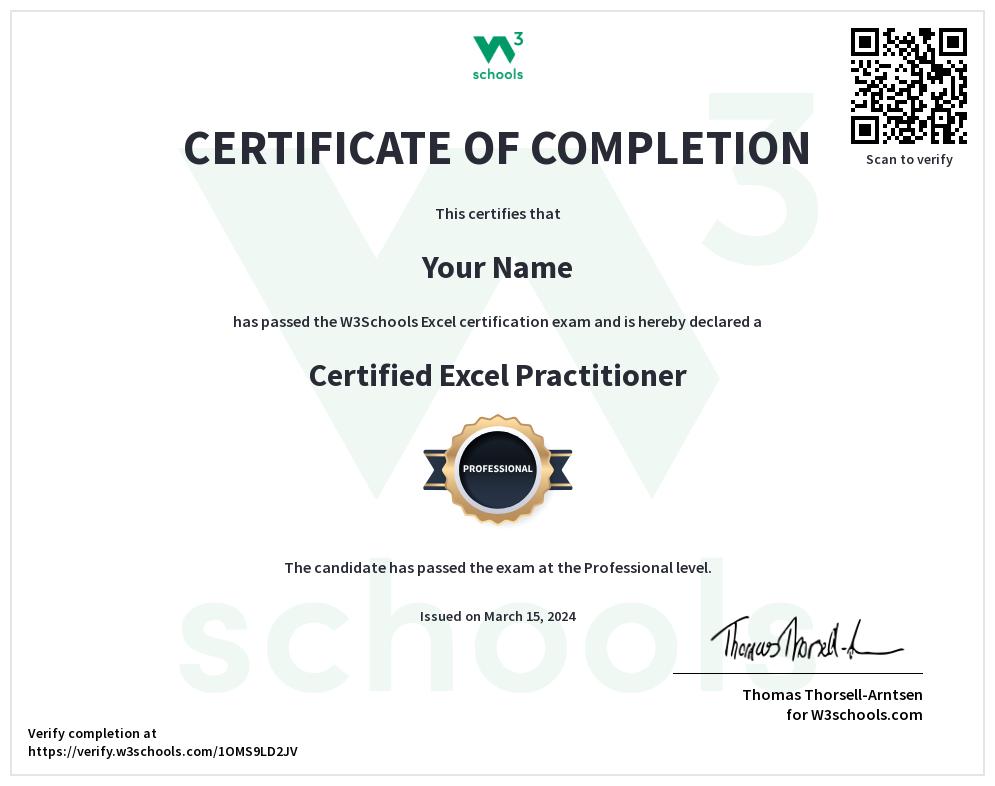
Become a Certified Excel Practitioner.

A credential from the site that has taught the web since 1999.

  1. Learn

    Lessons, quizzes and exercises. No deadlines.

  2. Pass the exam

    Online, multiple choice. 3 attempts, results instantly.

  3. Share it

    On LinkedIn and your CV. Employers verify it by link or QR code.

Your score sets your level: Intermediate 40% · Advanced 75% · Professional 90%

Certified Excel Practitioner

Also included

A year of W3Schools Hero subscription.

Keep learning and building long after the exam. Worth $120, included.

  • Unlimited learning in the app

    Full access on iOS and Android. Learn anywhere.

  • Build with Spaces

    Your own space to build, test and deploy real projects.

  • Ad-free W3Schools

    Learn on w3schools.com without ads.

  • Leaderboard and challenges

    Earn XP, keep your streak, compete with other learners.

Reviews

What learners say.

4.8 · 873 reviews

  • W3 Schools' 'Full Access' plan may be the best learning resource I've ever found. I've read books, followed various online tutorials, and completed university studies on the subjects, but W3 Schools' method is simply superior. Topics a...

    Ian B.Verified buyerUnited StatesFull Access
  • Practicing Python is awesome! I enjoy daily practice and it's so fun!!! W3school to me is a great platform for all Tech people Thank you so much

    Samuel A.Verified buyerGhanaPython
  • Muy buena experiencia. El curso de SQL tiene contenido claro y completo, y el examen de certificación me gustó especialmente por su nivel de dificultad y por combinar conocimientos teóricos y prácticos. Muy recomendable para reforzar y v...

    Guille G.Verified buyerArgentinaSQL

Pricing

One course, or all of them.

This course

Learn Excel

$95one-time

  • The full Excel course
  • Excel exam and certificate
  • 1 year of W3Schools Hero subscription
  • Lifetime access
14-day money-back guarantee, as long as no exam attempt is used.

Best value

Full Access

$499one-time

  • 45+ certifications
  • W3Schools Hero subscription for life
  • Lifetime access
  • New courses and exams included as we add them
Get Full Access 14-day money-back guarantee, as long as no exam attempt is used.

Questions? Answers.

Do you have a money-back guarantee?

Yes. If you are not satisfied, you get your money back within 14 days of purchase, as long as no exam attempts are used. Our refund policy.

How fast do I get access?

Instantly. Right after purchase you get an email with access to the course and the exam.

How does the exam work?

The exam is online and multiple choice. You get 3 attempts and choose when to take each one. Your score sets your level: Intermediate (40%), Advanced (75%) or Professional (90%).

Does the certificate expire?

No. The certificate never expires. It is issued in your name and employers can verify it with a unique link or QR code.

What is the difference between the course and the exam?

The course includes lessons, exercises, progress tracking and the exam. If you already know the subject, you can buy the exam only and go straight to certification.